Legend | Option / Function | Description |
1 | Never Record | The conversation will not be recorded.
NOTICE! Use Never Record to create deny lists. To prioritize this rule, place it at the top of the profile.
You cannot use the settings in 4 | Recorded Media and Retention Time.
|
2 | Autostart Recording | The recording of the conversation starts automatically.
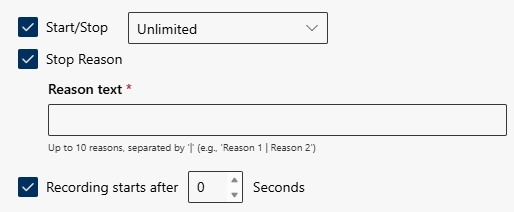
 Start /Stop: Specify how often record can be stopped and restart again. Start /Stop: Specify how often record can be stopped and restart again.
- Unlimited: The recording can be stopped and restarted as often as desired.
- Stop once: The recording can be stopped once and cannot be restarted.
- Stop once & Start once: The recording can be stopped and restarted once.
Stop Reason: Enter a reason why the recording must be stopped.
Recording starts after X Seconds: Set the number of seconds after which the automatic recording should start.
NOTICE! Settings in 4 | Recorded Media and Retention Time are available, see 4 | Recorded Media and Retention Time.
|
3 | On-demand Recording | The conversation will be recorded on-demand.
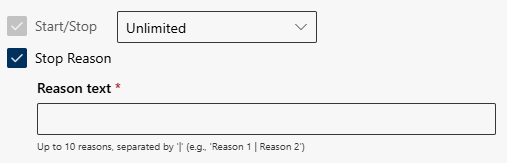
 Start/Stop: Specify how often the recording can be stopped and restarted after the initial start. Start/Stop: Specify how often the recording can be stopped and restarted after the initial start.
- Unlimited: The recording can be started, stopped and restarted as often as desired.
- Start once: The recording can be started once and cannot be stopped.
- Start once & Stop once: The recording can be started and stopped once.
Stop Reason: Enter a reason why the recording must be stopped.
NOTICE! Settings in 4 | Recorded Media and Retention Time are available, see 4 | Recorded Media and Retention Time.
|
4 | On-demand Recording on Media Level |
The conversation will be recorded on-demand based on media type(s).
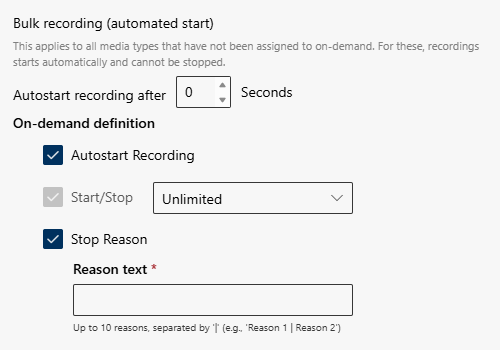
Autostart recording after X Seconds: Set the number of seconds after which the automatic recording should start.
Autostart Recording: Decide whether the recording should start automatically or not.
Start/Stop: Specify how often the recording can be stopped and restarted after the initial start.
- Unlimited: The recording can be started, stopped and restarted as often as desired.
- Start once: The recording can be started once and cannot be stopped.
- Start once & Stop once: The recording can be started and stopped once.
Stop Reason: Enter a reason why the recording must be stopped.
NOTICE! Settings in 4 | Recorded Media and Retention Time are available, see 4 | Recorded Media and Retention Time.
|
5 | Keep/Delete | Option for recording settings and the functionality applies to the entire recording. When enabled, you can decide during and, if applicable, after the conversation whether the recording should be kept or discarded.
Decide if the Start Mode should be kept or deleted.
- Start Mode - Keep: The conversation is always recorded. Users can change the start mode to Delete during the conversation or during the post-editing time.
- Start Mode - Delete: The conversation is always deleted. Users can change the start mode to Keep during the conversation or during the post-editing time.
NOTICE! Keep/Delete settings will continue even if the meeting type changes, e.g. when an external participant joins an ongoing internal meeting.
|
6 | Wrap-up time | Activation and definition of the wrap-up time.
Possible values are 1 - 900 seconds.
The wrap-up time indicates how long users can change modes once the conversation has been released. An information window indicates the remaining time. |